TELL ME MORE - SUBSCRIPTION INFORMATION 
Return to the homepage

Securely share records with your referrals and patients

Dolphin Imaging & Management Solutions offers AnywhereDolphin.com as a subscription service to clients who use Dolphin Imaging Premium version 10 or greater.
 

AnywhereDolphin is a great way to transfer or share records with referrals and patients.  The integrated service makes uploading the records quick and easy.  Because the records are transferred via encrypted transmission over the Internet, you don't have to make copies, print images, and send the records through mail. The streamlined process saves you time and money.
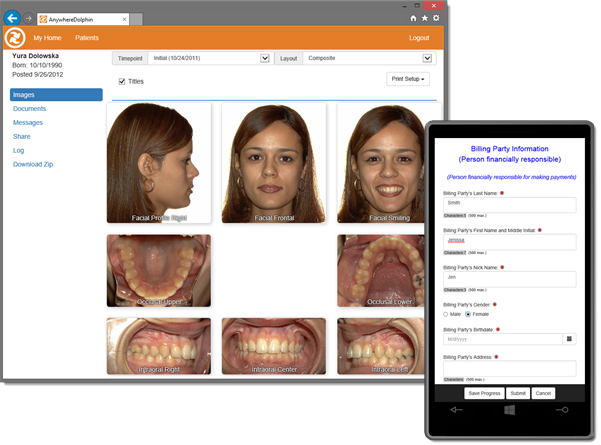
 

Sharing records with AnywhereDolphin is really easy.  You provide the recipient's email address and select the images you want them to see, create a short note, and then hit the Finish button. AnywhereDolphin automatically sends the recipient a message, informing them that the records are available online. The recipient can view the images from their favorite Internet browser... they don't need to download or install any new software.

Dolphin offers a variety of plans based on monthly storage use in megabytes (MB). Our first-level plan of 50 MB is available at zero monthly fee, although overage and other charges might apply (details below).

top

Requirements

top

Subscription and billing information

Subscription Plans and Billing Policy
AnywhereDolphin offers a selection of subscription plans based on monthly storage use in megabytes (MB). Depending on the volume of your practice, you may choose a subscription plan that best suits your needs. You can change your plan at anytime, however the change will not go into effect until your next billing cycle.

Your subscription fee (if there is one) is charged at the beginning of the billing period. Overage and other charges will appear on the following statement.

AnywhereDolphin Pricing Table 

Overage Charges
Overages occur when you exceed your Plan’s storage limit. The overage is averaged over the billing period, which is typically a month, and is based on the highest daily value. For example, if you upload 10 GB in the morning, and then remove 5 GB in the afternoon, the 10 GB will be the number used when calculating your daily overage.

To clarify how overage is calculated, let's look at an example for a user that has selected the 125 MB subscription plan.  For this example, we'll use a 30-day billing cycle. In the chart below, each day is represented by a vertical bar and shows how many megabytes were on the server during the day. The highlighted section above the 125 MB mark represents overage. 

Example of how overage is calculated 

There are 8 days in this example where the storage requirements went above the 125 MB plan. At the end of the billing cycle, the overage cost is calculated as follows:

Total MB over plan / number of days in plan * Overage per MB price

(5+10+75+15+5+15+5+10) / 30 * 0.60 = $2.80

As you can see in this example, even though overage charges were incurred, they were not high enough to warrant a larger subscription plan. If you find that you only exceed your plan limit occasionally, your overage charges will still keep the cost below the next plan.

If you want to prevent yourself from going over your plan limit, then you can set your preference on the "Allow me to upload in excess..." checkbox on the Personalization page.

You can stop yourself from going over your plan limit by setting preferences. 


Other Charges
Your account will be charged a small fee ($1 per record) each time a referral downloads your records to their Dolphin Imaging system. You can choose whether or not your referral is able to download the records into their Dolphin Imaging System when you share the records. Please note that this charge does not apply when your referrals view the records online in their favorite browser.

top

Which subscription plan should I choose?

Several factors affect your decision when choosing a subscription:

The amount of space used for records will vary, depending on several factors including image size, number of timepoints, and whether you upload the original uncropped images.

top

How do I get started?

If you already have a referral account, log into AnywhereDolphin with your current username/password. Click on the Account/Billing link, and then click on the "Edit" link at the top of the page to select your subscription plan and enter your billing information.

If you don't have an account, click on Create an Account and follow the instructions. You are on your way to a new frontier in patient and referral communication!

top